
Disclosure up front: I am designing an under-desk mount, Undershelf, and this guide comes out of that work. The rules below apply to any mount. The numbers come from airflow simulation, not from a real Mac in a real mount; I say which is which, and a physical test is planned.
The short answer
- Leave the Mac's base open to the room. A cradle that holds it by the edges is fine.
- Keep any flat surface (a shelf, a tray, a plate) at least 25 mm below the base, and away from the rear of it.
- Keep hubs and SSDs beside the Mac, not under it. Their heat ends up in the Mac's intake.
- A fan underneath helps a little if it blows up toward the Mac and keeps running. Blowing down makes things worse.
- Leave the back clear for cables and air, and make sure you can still reach the power button underneath.
Where the Mac mini takes in and pushes out air
Apple's guidance for the 2024 Mac mini is only that the vents are on the bottom and the rear, and that both need some clearance (Apple Community). Teardown-based accounts and owner reports agree that air comes in through the ring on the base and that the warm air leaves at the back, but they disagree on whether it leaves through the rear part of the bottom ring or through the back. I could not settle that from public sources, so I simulated both. The power button is on the underside near the back corner (AppleInsider).
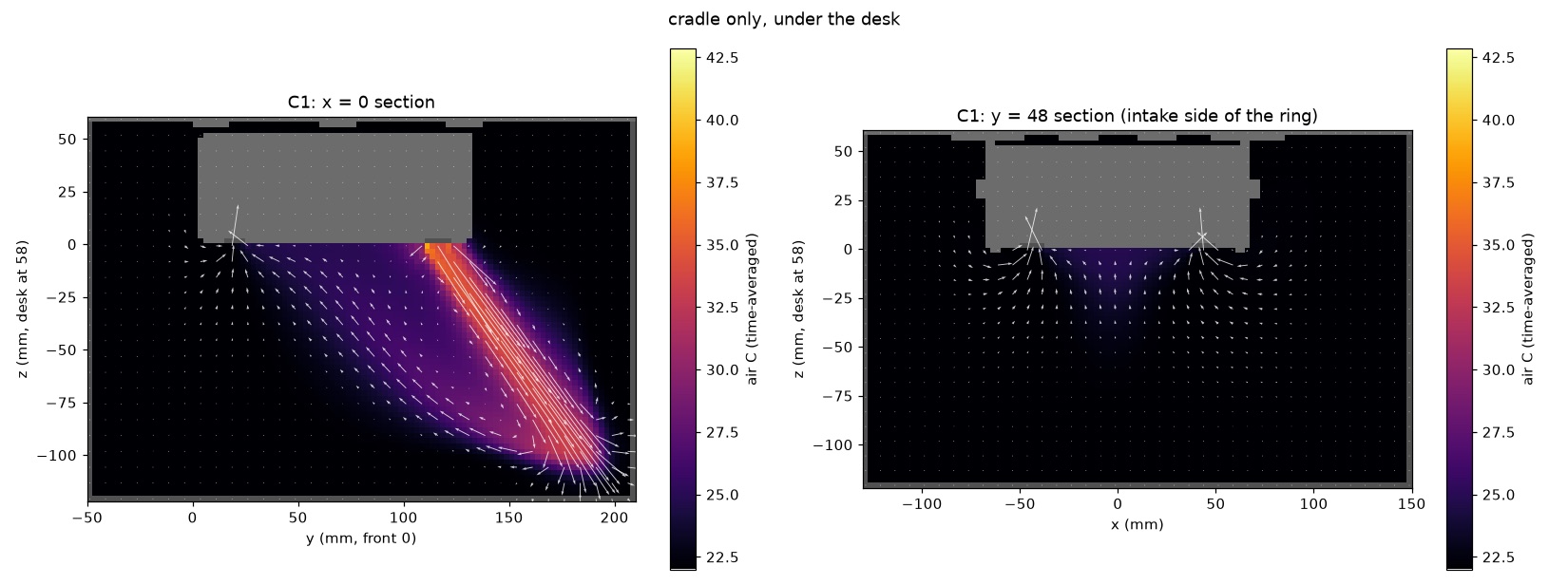
That layout is the whole story. A Mac that breathes through its base cares about the space below it. If its own warm air can come back round to the intake, it breathes that air again, and everything inside runs warmer by about the same amount.
What I simulated
I ran a lattice Boltzmann airflow and heat simulation of the space under a desk with a Mac mini in a cradle, at 2.5 mm resolution. The Mac was modelled as producing 65 W of heat under sustained load, moving 4 litres of air a second through its base. Both figures are assumptions; Apple does not publish them. The solver matched the textbook answer for flow between two plates to within 0.3%. The number I report is how much warmer than the room the air entering the Mac is.
| Set-up (Mac at 65 W) | Intake air above room |
|---|---|
| Cradle with an open floor | 1.1 C |
| Same, with a hub drawing 5 W beside the Mac | 1.5 C |
| A flat plate with a fan 10 mm below the base, fan off | 5.8 C |
| Same plate 25 mm below, fan moved clear of the exhaust, fan off | 1.9 C |
| A 92 mm fan below, blowing up, low speed | 0.8 to 0.9 C |
| The same fan blowing down | 2.7 C |
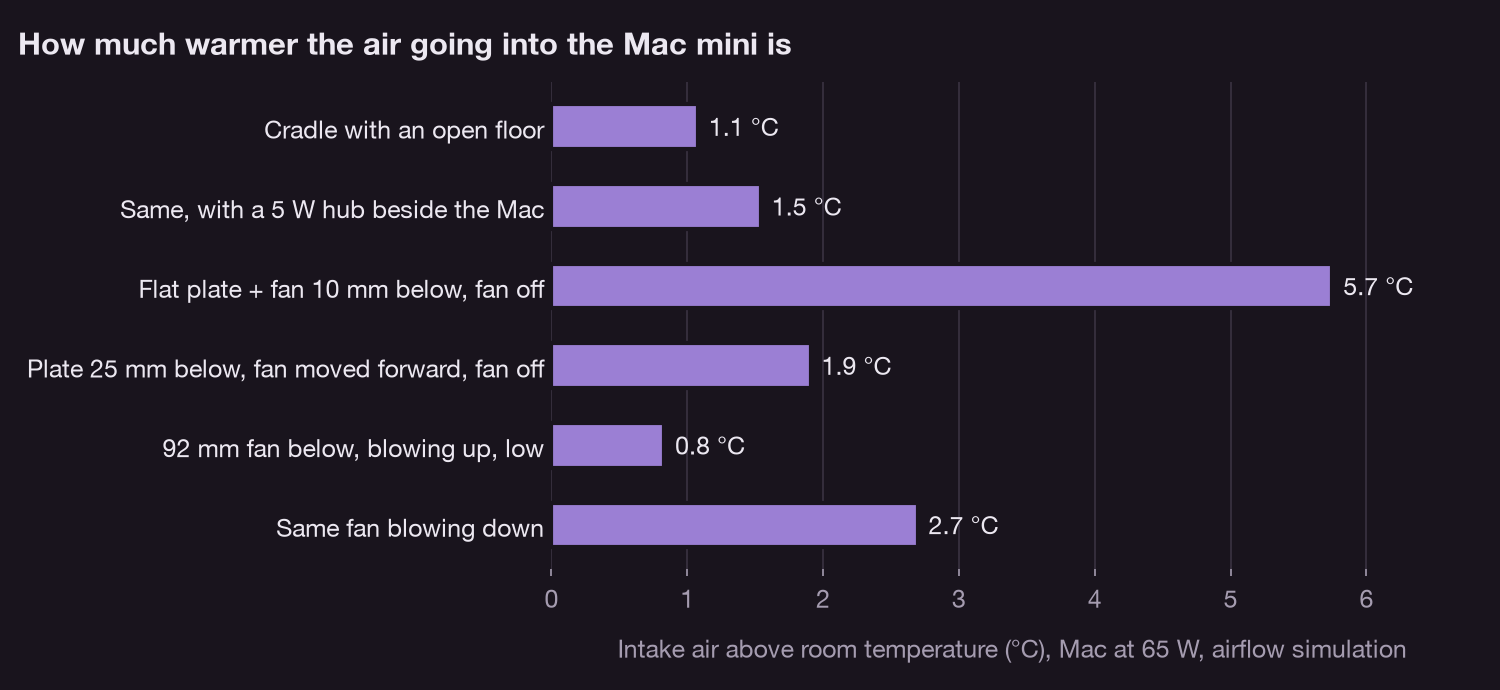
If the Mac exhausts out of the back rather than the rear of its base, the plate at 10 mm costs only about 1.2 C, so treat the bad case as the warning it is, not a precise figure. I could not get a trustworthy number for a Mac standing on a desk top, so I do not compare against one here.
Does a degree or two matter?
A little. Under a long compute job, my own M5 Pro Mac mini held its hottest die sensor at about 93 to 96 C with the fan near 3,150 rpm (measured with a small sensor logger, not simulated). A Mac at that point responds to warmer intake air by spinning its fan faster first and, if that is not enough, by lowering its clock. One or two degrees of warmer intake means a slightly louder fan, not a slower Mac. Five or six degrees is where I would start to expect lower sustained clocks, and I have not tested that.
Rules for any under-desk mount
- Open floor. Hold the Mac by its edges. A solid shelf directly under the base is the worst layout.
- 25 mm or more below the base for anything flat, and nothing flat right under the back half, where the warm air leaves.
- Hubs and drives to the side. A 5 W hub raised the intake air by about half a degree in the simulation, even beside the Mac.
- Fans blow up and stay on. A stopped fan under the Mac is a flat plate with a hole in it.
- Solid wood or board for the screws. Not a hollow or honeycomb desk top, and screws shorter than the desk is thick.
- Reach the power button without taking the Mac down.
Undershelf
Undershelf is the mount I am designing with these rules: an open floor, a ridge that holds the Mac, room for the power button, and a drilling template. Before it is sold it gets a physical hang test and a with-and-without temperature run on a real Mac, and I will publish both. Join the waitlist if you want one email when it is ready.
What I have not verified
- The Mac's real heat output, airflow and exhaust direction. All three are assumptions above.
- The simulations were stopped after 1.6 seconds of simulated time while the warm air was still building slightly, so the numbers are a little low. The order of the set-ups did not change between earlier and later checkpoints.
- No real Mac has been tested in Undershelf yet.