
LaTeX tools and AI manuscript review
Free tools for LaTeX, citations and document conversion, plus paid AI checks for a manuscript before it goes out. No account and nothing to install.
The free tools keep a file on our server only while the result is built, then delete it. Tools marked In your browser never upload anything. Each paid tool explains its data handling on its own page.
Write in LaTeX
Compile, compare and produce figures and tables from .tex sources.
-
LaTeX to PDF
Upload a .tex file or project zip and get a compiled PDF. pdfLaTeX or XeLaTeX.
-
LaTeX Diff
Upload two versions and get a tracked-changes comparison PDF.
-
Equation Renderer
Paste LaTeX math and download a high-resolution PNG.
-
LaTeX Table Generator
Paste CSV or TSV data and get a booktabs LaTeX table.
Convert between formats
Move documents in and out of LaTeX, Markdown and Word.
-
LaTeX to Word
Convert a .tex paper into a standard double-spaced Word manuscript.
-
Word to LaTeX
Upload a .docx and download a .tex starting point, made with Pandoc.
-
Markdown to PDF or Word
Paste or upload Markdown and download a clean PDF or .docx.
-
File to Markdown
PDF, Word, PowerPoint, Excel, HTML, CSV or EPUB to clean Markdown.
-
PDF to Structured Data
Reading-order Markdown and JSON from a PDF, with tables, math as LaTeX and figure captions.
Citations and references
Build, check and convert reference lists.
-
BibTeX Validator
Check a .bib for missing fields, dead DOIs and references that do not exist.
-
Retraction Checker
Paste references or DOIs and check each against Crossref for retractions.
-
BibTeX Builder
Paste DOIs or arXiv IDs and download a ready-to-use .bib file.
-
Citation Generator
Look up a DOI, ISBN or arXiv ID and get APA, MLA, Chicago or IEEE.
-
Reference Converter
Convert references between BibTeX, RIS and EndNote.
-
Reference Formats by Venue
What IEEE S&P, USENIX Security, ACM CCS, MISQ and other venues expect, preset to convert.
Before you submit
Checks for the week a manuscript, thesis or camera-ready copy goes out.
-
Submission Checklist
Twelve checks before you submit, each with the tool that does it. Progress stays in this browser.
-
Abstract Checker
Your abstract’s word count against the limits of 25 journals and conferences.
-
Thesis Format Checker
Margins, font size, embedded fonts, page numbers and line spacing of a thesis PDF.
-
Camera-Ready PDF Checker
Embedded and Type 3 fonts, page size, margins and metadata of an accepted paper’s final PDF.
-
Replication Package Checker
README sections, random seeds, absolute paths and missing data files in a replication zip.
-
Response Letter Template
Paste the reviewer comments and get each one numbered and quoted, with room for your reply.
AI manuscript review
Paid, from $2 to $39 a check, with no account. Files are deleted soon after delivery. Volume packs suit labs, and every price is on one page.
From $14Paper Review
Seven AI reviewers read your manuscript before a journal does: methods, statistics, data integrity, equations, the literature, the numbers and the editor’s view. Every reference is checked against Crossref. You get a Markdown report and an annotated PDF. Start a review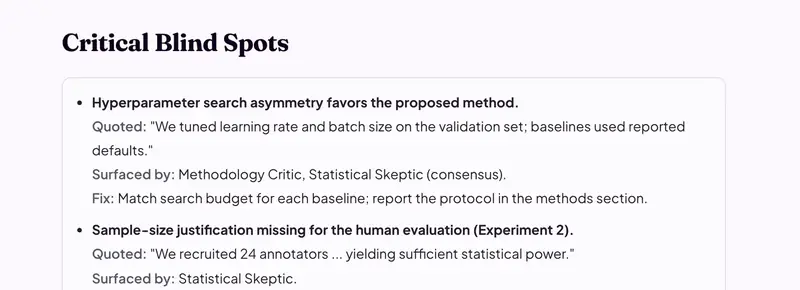
-
Response to Reviewers
Red-team your reply letter before it goes back to the editor.
-
Citation Gap Analysis
Find the prior work your manuscript should cite and does not.
-
Anonymity Check
Find what would break double-blind review before a desk editor does.
-
Cover Letter
A draft cover letter built from your abstract and target journal.
-
Revision Review
Check that a revision answers each point of the original review.
-
Resume Review
Would your resume get through an ATS filter and a real screen?
-
Volume Packs
Discounted Paper Review tokens for labs and repeat use. They never expire.
Convert files
Convert photos and drawings, make icons, turn pictures into PDFs and PDF pages into pictures, and move data between CSV, Excel and JSON. Everything here runs in your browser, so nothing is uploaded.
-
HEIC to JPG
Convert iPhone HEIC photos to JPG or PNG, one at a time or a whole batch as a zip.
-
WebP to PNG
Turn WebP images saved from the web into PNG or JPG that Word, PowerPoint and LaTeX accept.
-
PNG to ICNS
Make a macOS .icns icon with every size from 16 to 1024 pixels, plus an optional .iconset folder.
-
PNG to ICO
Make an .ico file for a favicon or a Windows icon, with sizes from 16 to 256 pixels.
-
AVIF to JPG
Convert AVIF images saved from the web into JPG or PNG.
-
JPG to PDF
Turn JPG and PNG pictures into PDF pages, one each or joined into one file. JPEGs are not recompressed.
-
CSV to XLSX
Convert CSV files to Excel workbooks without losing leading zeros, long IDs or date-like text.
-
PDF to JPG
Turn PDF pages into JPG or PNG images at 72, 150 or 300 dpi, all pages or a range.
-
SVG to PNG
Convert SVG figures and icons to PNG or JPG at 2x, 4x or an exact width, for LaTeX, Word and slides.
-
PNG to JPG
Make PNG, GIF and BMP images into smaller JPG files, with the quality and background you choose.
-
XLSX to CSV
Turn Excel workbooks into CSV files, one sheet or all of them, with dates written as dates.
-
JSON to CSV
Turn JSON and JSON Lines into CSV or Excel, with nested objects as columns and long IDs kept exact.
-
TIFF to JPG
Convert TIFF scans and images, including multi-page, 16-bit and fax TIFFs, to JPG or PNG.
-
CSV to JSON
Turn CSV files into JSON or JSON Lines, with numbers typed only when a whole column is numeric.
-
ICNS to PNG
Get the PNG images out of a macOS app icon, the largest size or a whole .iconset folder.
-
ICO to PNG
Get the PNG images out of a favicon, Windows icon or cursor, with transparency kept.
-
XLSX to JSON
Turn Excel workbooks into JSON or JSON Lines, with numbers, booleans and dates keeping their types.
-
VTT to SRT
Turn WebVTT captions from YouTube, Zoom or Teams into SRT, with speaker names kept and repeats merged.
-
SRT to VTT
Turn SRT subtitles into WebVTT for HTML5 video and course sites, with old encodings read correctly.
-
Excel to LaTeX
Turn an Excel sheet into a LaTeX table with booktabs rules, a caption and escaped special characters.
-
PDF to Text
Extract the text of a PDF to a plain .txt file, as paragraphs or line by line.
-
Image to Base64
Turn an image into a data URL, CSS background or HTML img tag, ready to copy.
Make a logo
Draw a logo mark from a photo with lines and circles, in your browser.
Files and privacy
PDF housekeeping, and checks for what a file or a transcript gives away.
-
PDF Tools
Merge, split and compress PDFs. Merge and split run in your browser.
-
Metadata Cleaner
Remove author names, GPS and edit history from photos, PDFs, Office files and video.
-
PDF Redaction Checker
Check whether text under black boxes in a redacted PDF can still be read. It does not redact anything.
-
PII Checker
Mark the email addresses, phone numbers, ID and card numbers in a text. It does not find names.
-
Transcript Cleaner
Turn a Zoom or Teams .vtt, an .srt or a labelled .txt into readable text, or keep timestamps for NVivo.
Everyday utilities
Small jobs that come up around the writing.
-
Word Counter
Live word, character, sentence and reading-time counts.
-
Academic Email Signature Generator
A signature with your ORCID iD, Google Scholar and lab site, for Apple Mail, Gmail and Outlook.
-
Mac Keyboard Tester
Light up keys on a MacBook layout, count the keys held at once and hear recorded keyboard sounds.
-
Stock Photo Keyword Cleaner
Lowercase and de-duplicate stock photo keywords, then fit them to each agency’s limits.
Mac apps from the same studio
For the work these tools sit next to: writing the manuscript, and keeping track of where it went.
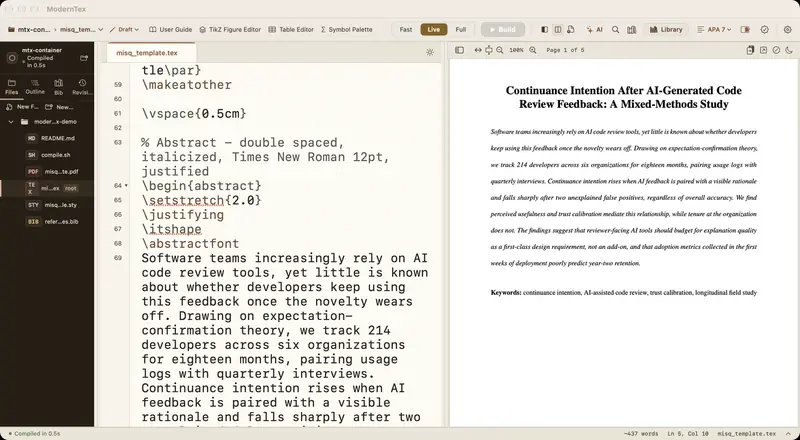
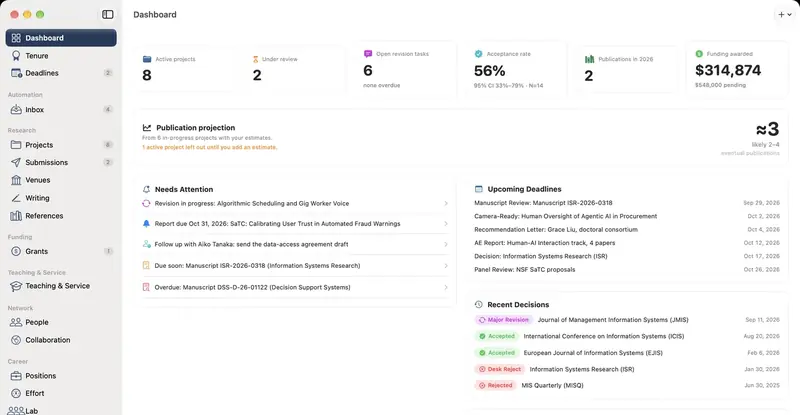
Privacy-respecting tools, free and paid
The free tools are LaTeX, citation and conversion utilities for academic authors. They compile to PDF, convert to and from Word, diff versions, validate BibTeX, render equations and more. Your files sit in a temporary folder on our server only while the result is built, then they are deleted, so unpublished manuscripts are not kept. Tools marked In your browser do their work on your computer and upload nothing.
The paid Paper Review tool runs an AI red-team review of an uploaded manuscript. That review depends on a third-party language model (Anthropic’s Claude API), so its data-handling guarantees differ from the in-house free tools. The Paper Review page lists the retention details before you upload.
Frequently asked questions
Are these tools free?
Do you store my files?
Do I need to install anything?
If these save you time, you can leave a tip. It helps keep them free and online.