
Tapefolio
Tapefolio transcribes interview and meeting recordings on your Mac, labels the speakers, helps you replace names and other identifiers, and reads scanned pages and photos into searchable text. Your files are not uploaded.
The trial is the complete app for seven days from the first time you open it, with no account and nothing to enter. Buying is a single $29.99 payment, with every update included. You get a license key by email and on the page after you pay; paste it into the same app and it stays unlocked, with no second download. One key works on two of your Macs. Not useful? Email ben@purplelink.llc within 14 days of purchase (terms). Version 1.0.0, released October 9, 2026. 43 MB disk image. Needs macOS 26 or later on a Mac with Apple silicon.
Also in the Mac Suite: ModernTex, Outbound Veil, Legroom, Keyfeel, Tapefolio and Vitae Plus for life, $54.99 once.
Forty-five seconds in the app
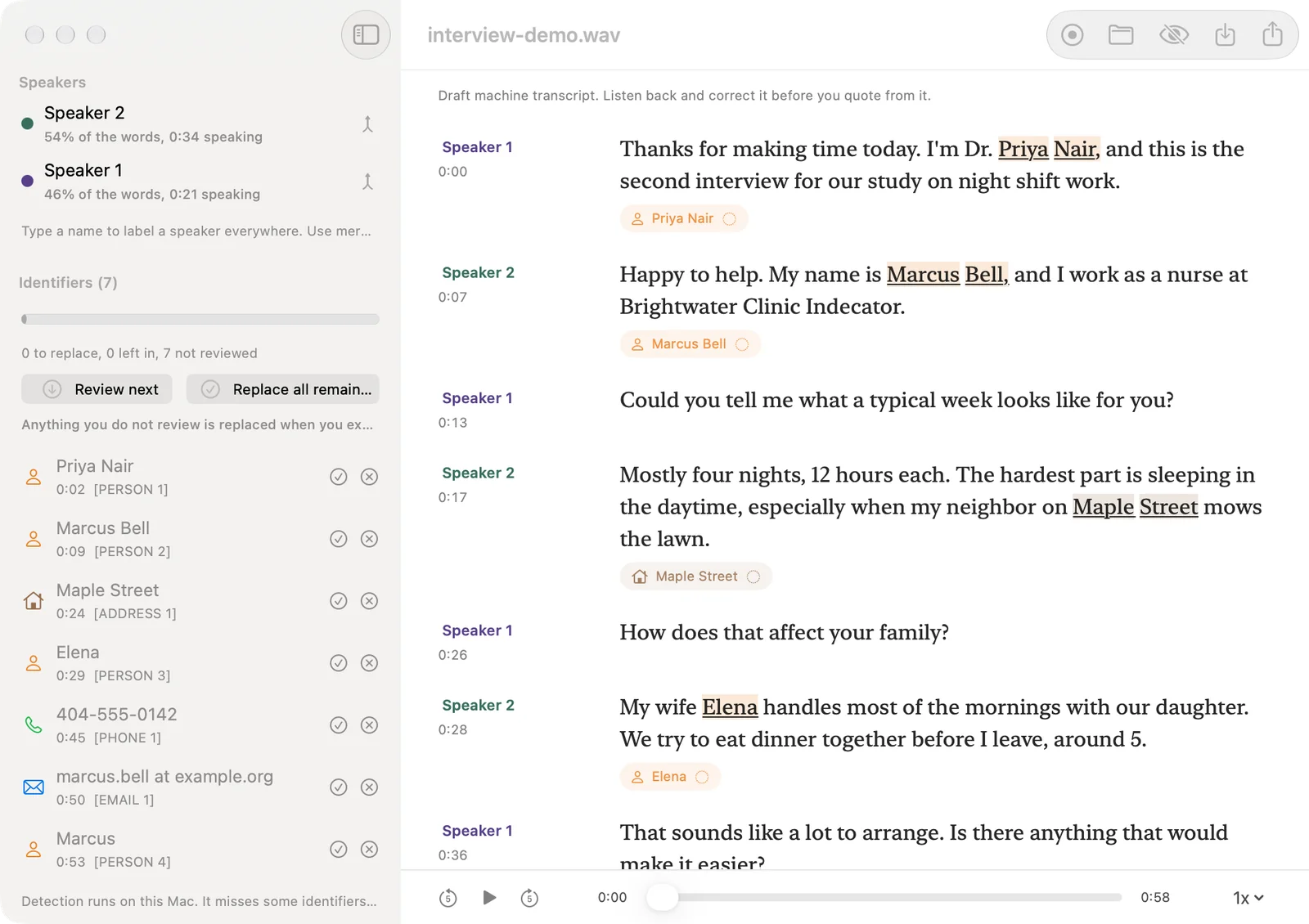
The review screen on a demo interview, replacing or keeping each identifier, the export sheet, Batch OCR and the model settings. The footage is the running app. The interview is invented and read by computer voices.
How it works
You add a recording
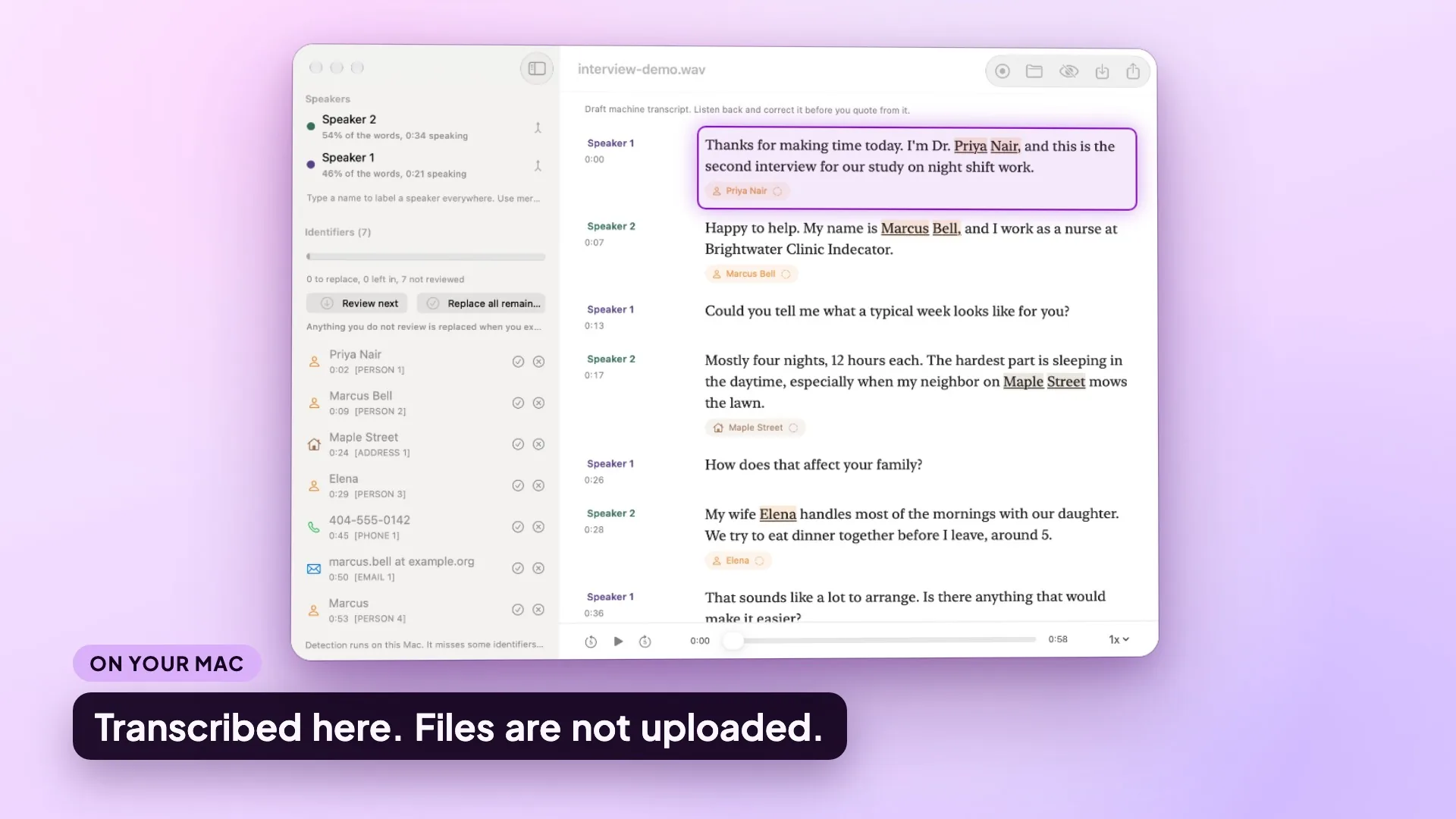
Open audio files, or record from the microphone inside the app. Tapefolio transcribes on your Mac and keeps the time of every word.
You check it against the audio
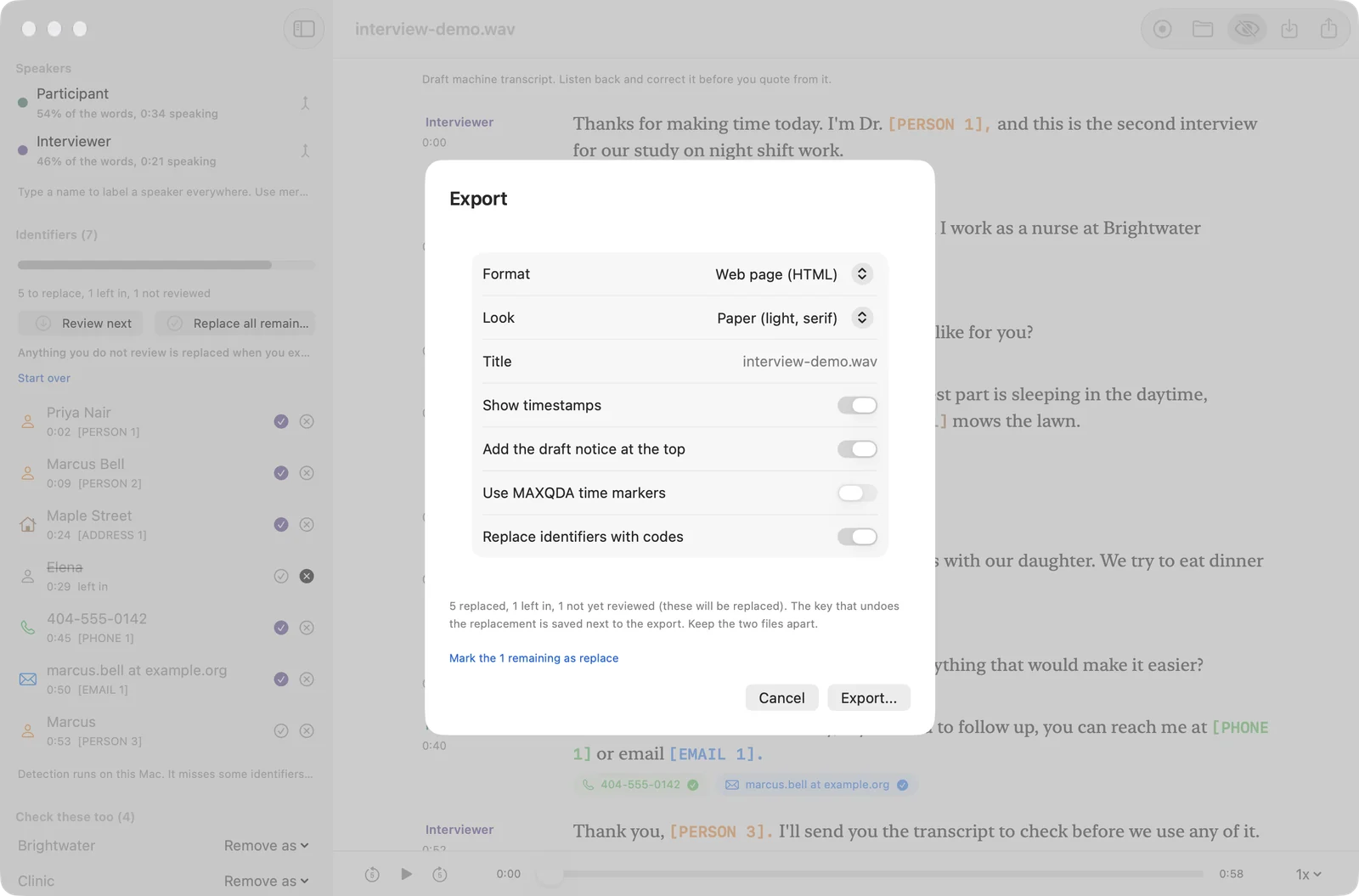
The review screen plays the recording beside the text and highlights the word being spoken. You correct words, name the speakers and merge two labels that are one person.
You decide what is replaced
Identifier removal marks what it found. You replace or keep each one, or replace everything left, and then export. The key that maps the codes back is saved in a separate file.
What it looks like
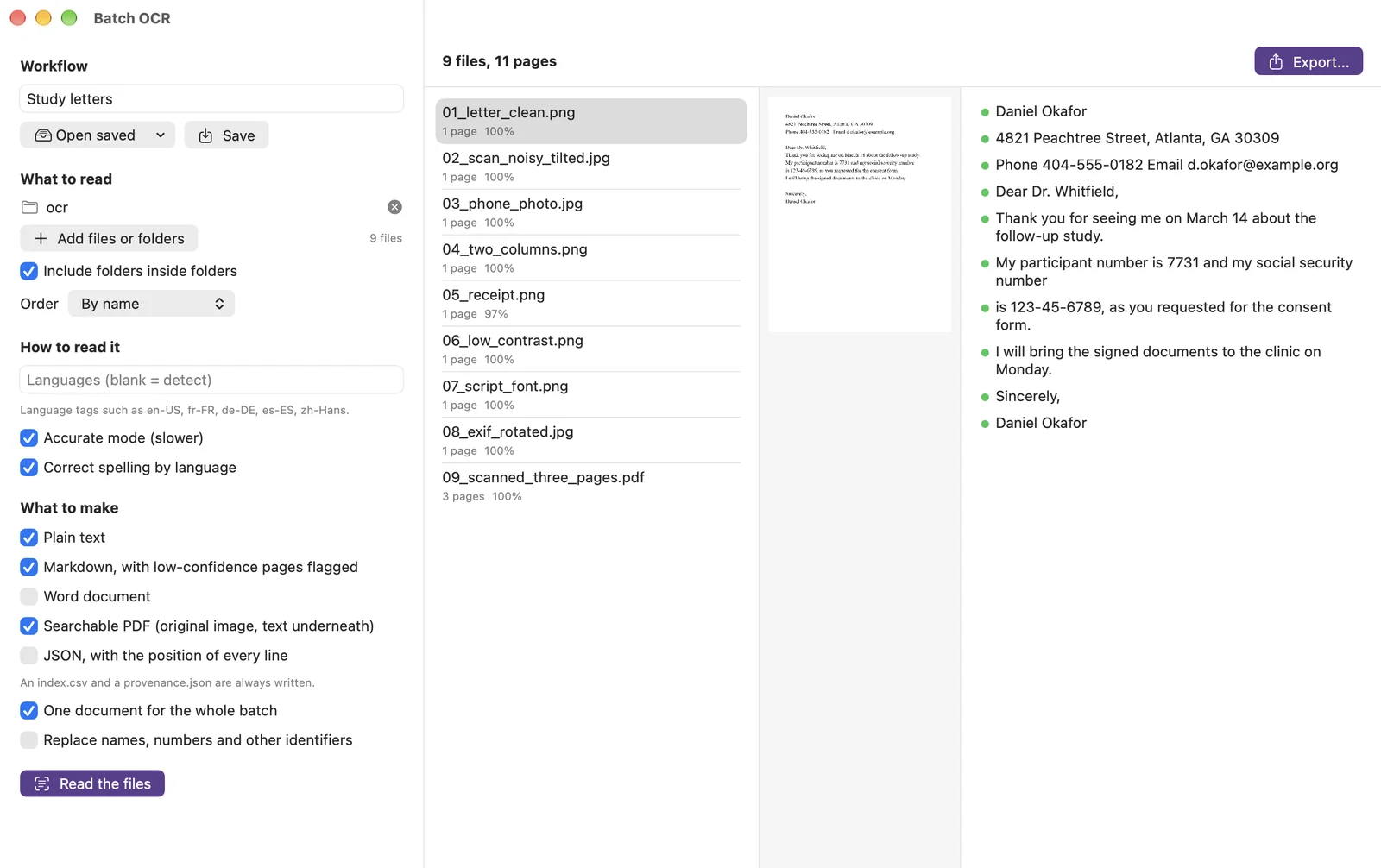
Captures of the running app. The recording in the first four is an invented interview read by two computer voices, and the letters in the OCR capture are generated test files, so every name and number is made up. The draft has transcription errors, and the first pass missed some identifiers.
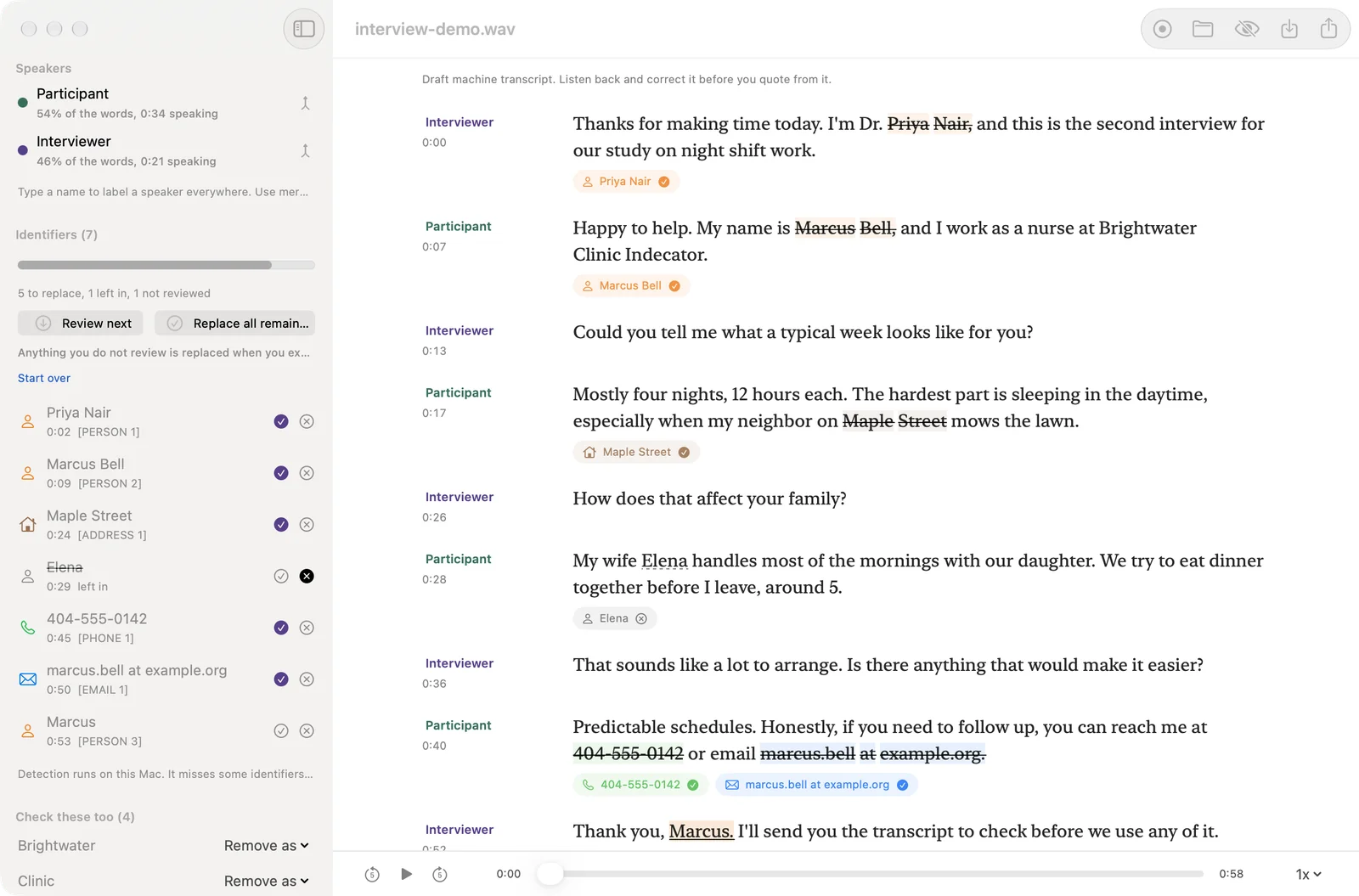
![The transcript with the replacements shown. The text reads Dr. [PERSON 1], [PERSON 2], [ADDRESS 1], [PHONE 1], [EMAIL 1] and [PERSON 3] in place of the names, street, phone number and email address. Elena and the words Brightwater Clinic Indecator are still readable.](/assets/tapefolio-screens/review-preview.webp)
What it does
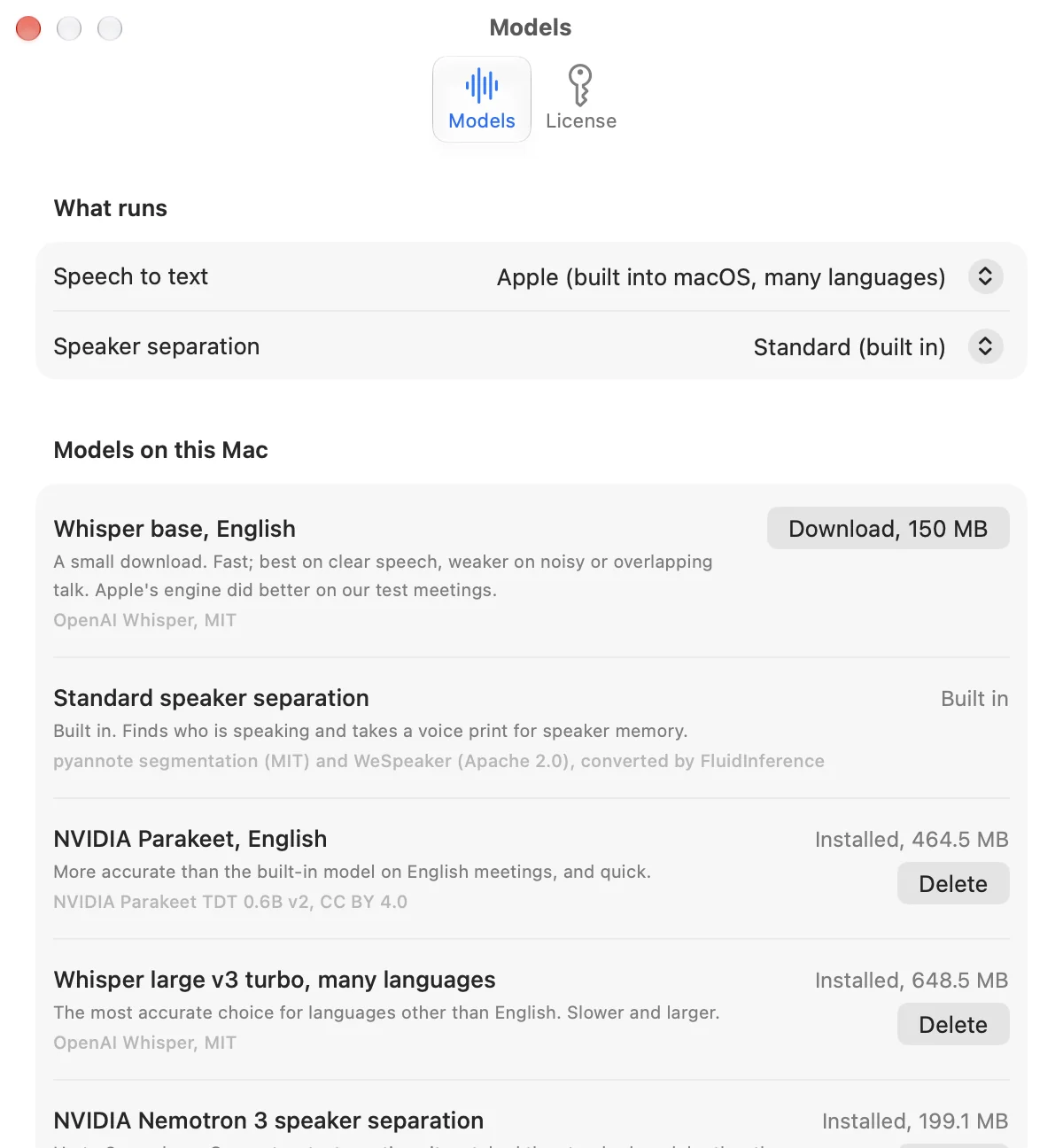
| Transcription | Transcribes audio on your Mac, with word timing. Until you download a speech model it uses Apple's on-device speech recognition, and macOS may fetch Apple's own model once the first time. Better models are optional downloads in Settings, from Hugging Face, each once: NVIDIA Parakeet for English, Whisper base for English and Whisper large-v3 turbo for many languages. Settings can delete any of them. |
|---|---|
| Speakers | Labels who is speaking, using the standard speaker-separation models that come with the app. In the review screen you name each speaker once and merge labels that belong to one person. NVIDIA Nemotron 3 Diarization is an optional download that separates speakers a second way. |
| Speaker memory | Optional, and opt-in for each project. Tapefolio requires a recorded consent note before it saves a voice. Voices are stored encrypted on your Mac, the app only suggests matches for you to confirm, and you can delete them. |
| Identifier removal | Finds names, places, organizations, emails, phone numbers, addresses, links, ID numbers and dates of birth, and replaces them with consistent codes. You review case by case: replace or keep each one, or replace all that remain. The key file that maps the codes back is kept separately. It misses some, so you read the result. |
| Review screen | An audio player next to the transcript, with the current word highlighted. Turns are editable, and you can rename or merge speakers and go through the identifier review without leaving the screen. |
| Export | Word, HTML, Markdown, plain text, SRT, VTT and JSON, and a timestamped Word file made to import into MAXQDA. |
| Recording | Record from the microphone in the app, then transcribe straight into the review screen. |
| Batch OCR | Reads photos, scans and PDFs, one file or a whole folder, and keeps two-column pages in reading order. Output is a searchable PDF with an invisible text layer, or text, Markdown, Word, JSON or CSV. You can save a workflow and run it again, and replace identifiers in the text with a separate key file. Each run writes a provenance record with a SHA-256 for every input file. |
What it will not do
| Get every word right | It will mishear words and mislabel speakers. Overlapping voices, quiet speech and short replies such as okay and yep are where it loses the most. Check any text you plan to quote against the recording. |
|---|---|
| Anonymize a transcript | Identifier removal finds many identifiers and misses some, and it cannot tell when a detail identifies someone only in context. It does not make a study compliant; that is for you and your ethics board. Read every transcript before you share it. |
| Read handwriting or phone photos reliably | OCR has been measured only on generated test files. Real handwriting and real phone photos of pages have not been tested. |
| Promise results in other languages | What has been measured is English meeting audio. Other languages, accents and a quiet two-person interview have not been measured, and Whisper is the model to try for languages other than English. |
| Run on an Intel Mac or an older macOS | It needs macOS 26 or later and Apple silicon. There is no Windows, iPhone or iPad version. |
| Send your files anywhere | There is no cloud transcription and there are no accounts. Nothing you open in Tapefolio is uploaded. |
How well it works
These are small checks, run on an M4 MacBook with 16 GB, and your recordings will differ. Treat every transcript as a draft.
| Words wrong | Two meetings from the AMI Meeting Corpus, four people each, headset mix. The word error rate was between 21% and 29% for Apple's engine, Parakeet and Whisper large-v3 turbo, and between 29% and 39% for Whisper base, the small optional download. Fillers are left out of the count, and many of the errors are dropped short replies and spelling conventions such as gonna and going. |
|---|---|
| Right speaker | On the same two meetings, between 87% and 94% of words were given to the right speaker. The speaker setting was tuned on those same two meetings, so a new recording may do worse. |
| Names found | Against the corpus's human labels on those meetings, identifier removal found 13 of 15 personal names and 2 of 2 places, and flagged one false place. That is a very small sample. |
| Scanned text | On 9 generated test files (11 pages), the OCR word error rate was 1.5%. |
Privacy and what downloads
Your files stay on your Mac
Transcription, speaker labels, identifier removal and OCR run on your Mac. There are no accounts. If your ethics board requires that recordings stay on your own computer, Tapefolio does its work there; whether that meets the board's rules is for you and the board to decide.
Downloads, each once
The internet is used for three things, and none of them carries your files. The optional model downloads inside the app come from Hugging Face, once each. The app's check for a new version sends the app's name, its version, the macOS version and the app's update token to purplelink.llc. And macOS itself may download Apple's own speech model once if you use Apple's speech recognition. There is no analytics and no account. Details are on the privacy page.
Voices are opt-in
Speaker memory is off until you turn it on for a project and record a consent note. What it saves is stored encrypted on your Mac, and you can delete it.
| Model | For | Size |
|---|---|---|
| Apple's speech recognition | Transcription, used until you download a model | None from Tapefolio; macOS may fetch Apple's model once |
| NVIDIA Parakeet | English transcription | About 470 MB |
| Whisper base | English transcription, a small download | About 150 MB |
| Whisper large-v3 turbo | Transcription in many languages | About 650 MB |
| NVIDIA Nemotron 3 Diarization | Separating speakers | About 190 MB |
Optional models can be deleted from Settings. The first time each model runs on a Mac, it can take a few minutes while macOS prepares the model for the Neural Engine, and Whisper large-v3 turbo can take about ten minutes the first time it runs on a given chip.
Credits: the speech models are NVIDIA Parakeet TDT 0.6B v2 (CC BY 4.0), run through FluidAudio and FluidInference (Apache-2.0), and OpenAI Whisper (MIT), run through WhisperKit (MIT, Argmax). The speaker models are from pyannote and WeSpeaker, via FluidInference. The measurements above use the AMI Meeting Corpus (CC BY 4.0).
Price and trial
Seven days free
The trial is the complete app, counted from the first time you open it. No account and nothing to enter.
$29.99, once
One payment in US dollars, through Stripe. After the trial the app asks for a license key, which arrives in the receipt email and on the page after you pay. Every update is included.
One key, two Macs
The key unlocks Tapefolio on up to two of your own Macs, works offline and needs no second download. Refunds within 14 days: email ben@purplelink.llc.
System requirements
| macOS | 26 or later. |
|---|---|
| Mac | Apple silicon. There is no Intel version. |
| Disk space | The app is about 40 MB, plus the optional models you choose to download (see the sizes above). |
| Permissions | macOS asks for microphone access the first time you record in the app. |
Frequently asked questions
What does it need to run?
Do my recordings leave my Mac?
How accurate is it?
Does it anonymize a transcript?
What happens to the key file?
Does it remember people's voices?
Which speech model should I use?
Why is the first run slow?
Does one license work on more than one Mac?
Are updates included?
What happens when the trial ends?
Can I get a refund?
How do I get help?
Try it on one recording.
Seven days of the complete app, no account and nothing to enter. Then decide whether to keep it.
macOS 26 or later · Apple silicon