
Software that lasts.
One person in Atlanta making apps and tools. Each page says plainly what happens to your data.
-
 ModernTex
A native LaTeX editor for Mac.
Free for 7 days, $19.99
ModernTex
A native LaTeX editor for Mac.
Free for 7 days, $19.99
-
 Outbound Veil
Checks what you type for personal information before you send it.
Free for 7 days, $29.99
Outbound Veil
Checks what you type for personal information before you send it.
Free for 7 days, $29.99
-
 Legroom
Shows free disk space and cleans the folders you choose.
Free for 7 days, $9.99
Legroom
Shows free disk space and cleans the folders you choose.
Free for 7 days, $9.99
-
 Keyfeel
Recorded key, click and scroll sounds for your Mac.
Free for 7 days, $9.99
Keyfeel
Recorded key, click and scroll sounds for your Mac.
Free for 7 days, $9.99
-
 Tapefolio
Transcribes interviews and reads scans on your Mac.
Free for 7 days, $29.99
Tapefolio
Transcribes interviews and reads scans on your Mac.
Free for 7 days, $29.99
-
 Vitae
Tracks your submissions, grants and CV, locally.
Free app, optional Plus from $2.99 a month
Vitae
Tracks your submissions, grants and CV, locally.
Free app, optional Plus from $2.99 a month
-
 Scholar Utility Belt
Journal rankings and h-index inside Google Scholar.
Free Chrome extension
Scholar Utility Belt
Journal rankings and h-index inside Google Scholar.
Free Chrome extension
-
 GlobePin
Places visited, flights taken and trips planned, on a 3D globe.
Free for iPhone and iPad
GlobePin
Places visited, flights taken and trips planned, on a 3D globe.
Free for iPhone and iPad
ModernTex, Outbound Veil, Legroom, Keyfeel, Tapefolio and Vitae Plus for life, together: the Mac Suite, $54.99 once.
The rest of the studio
Paper Review
Four AI reviewers read your manuscript before a journal does. From $9.
Free tools
In your browser, no account.
Guides
How-tos for LaTeX and academic writing.
The LaTeX studio built for how researchers write.
ModernTex is a native macOS manuscript studio. Multi-file editing, a PDF preview that stays in sync, citation management, and submission-readiness checks. It's shaped around the manuscript workflow, not a generic text editor.
Not useful? Email ben@purplelink.llc within 14 days of purchase and it is refunded.
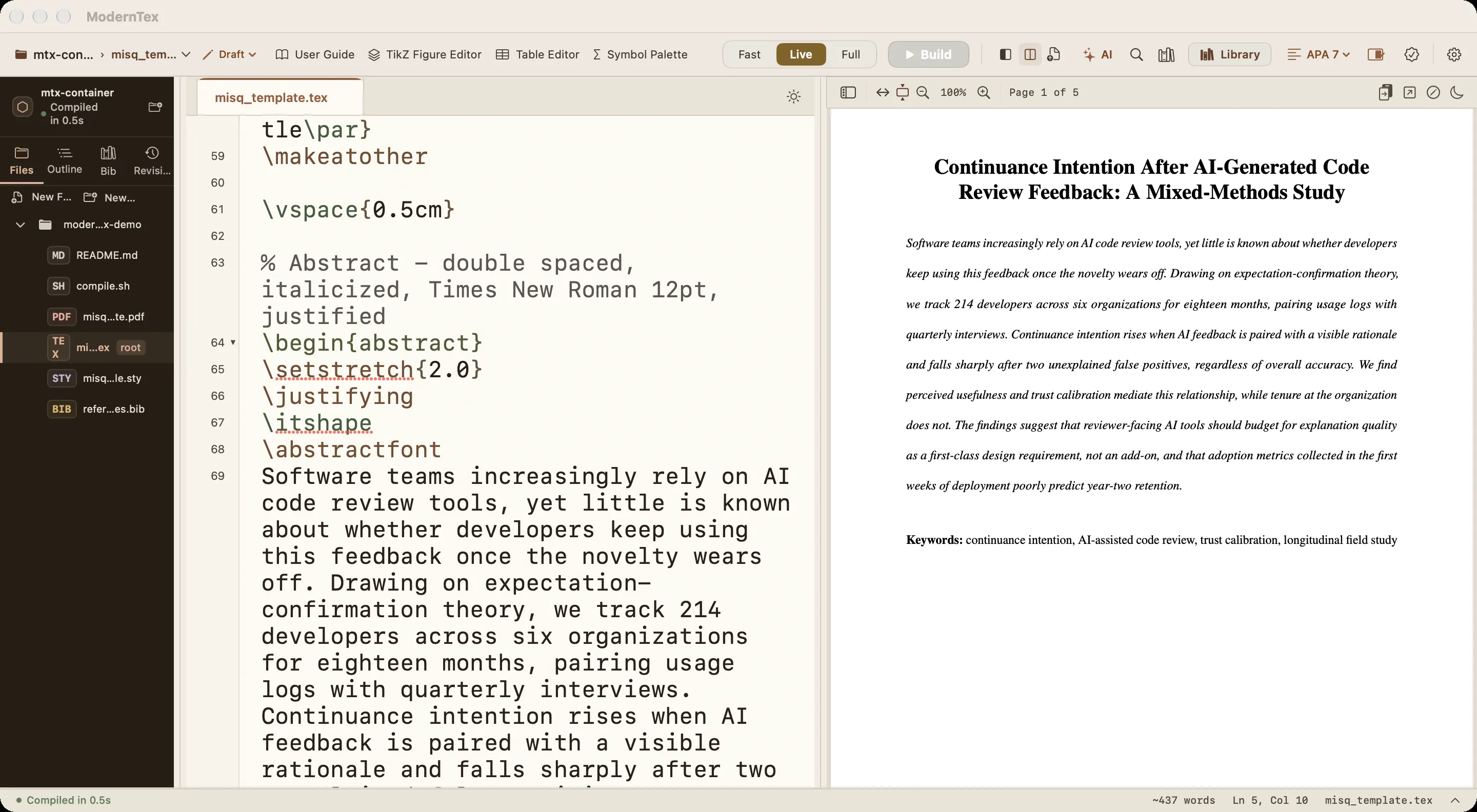
- Source and PDF stay in sync as you type, with click-to-locate between them.
- Three compile modes for drafting, full builds, and submission.
- Citation management with BibTeX autocomplete and reference checks.
- Submission-readiness checks before you upload to a journal.
What things cost
- FreeThe LaTeX and BibTeX tools, Vitae (its optional Plus subscription is $3 a month) and Scholar Utility Belt.
- $2 to $6Single manuscript checks, such as Anonymity Check at $2 and Response to Reviewers at $6.
- $9 to $15Paper Review, with references checked free first.
- $9.99 onceLegroom, after a 7-day trial.
- $9.99 onceKeyfeel, after a 7-day trial.
- $19.99 onceModernTex, after a 7-day trial.
- $29.99 onceTapefolio, after a 7-day trial.
- 7-day trialOutbound Veil, then $29.99 once.
Before you submit
Find what Reviewer 2 will find, first.
Paper Review puts your manuscript in front of four AI reviewers (a methodology critic, a statistical skeptic, a data integrity officer and an editor), checks every reference against CrossRef and scans the figures. You get a prioritized list of fixes, quoted from your own text, in minutes. No account. The manuscript and the review are deleted 30 minutes after you first open the result, or after 24 hours if you never open it.
Not ready to pay? The free submission checklist walks through the twelve checks worth doing, and can email you a week before your deadline.
Buying for a lab? Volume packs, invoices and a W-9 are on the labs page.
Critical blind spots
Sample-size justification missing for the human evaluation. Quoted: “We recruited 24 annotators … yielding sufficient statistical power.” Fix: report a sensitivity analysis (the smallest effect 24 annotators can detect) and confidence intervals.
Data-to-claim contradictions
Claim: “Our method beats all baselines by a wide margin.” Table 2 shows it tied with Baseline C within standard errors on 4 of 7 datasets.
Rectification checklist
- A Add the hyperparameter search protocol to Section 3.2.
- B Reference [17] only weakly matches CrossRef; check its title and DOI.
- C Redraw Figure 3 without the broken y-axis.
Shipping now · Chrome extension
Scholar Utility Belt
Journal quality badges (ABDC, FT50, UTD24, SJR), citation velocity, author metrics like h-index and g-index, academic lineage trees, and retraction alerts, added directly to Google Scholar. Rankings are bundled locally: no tracking, no accounts.
use it
Rating and install count from the Chrome Web Store.
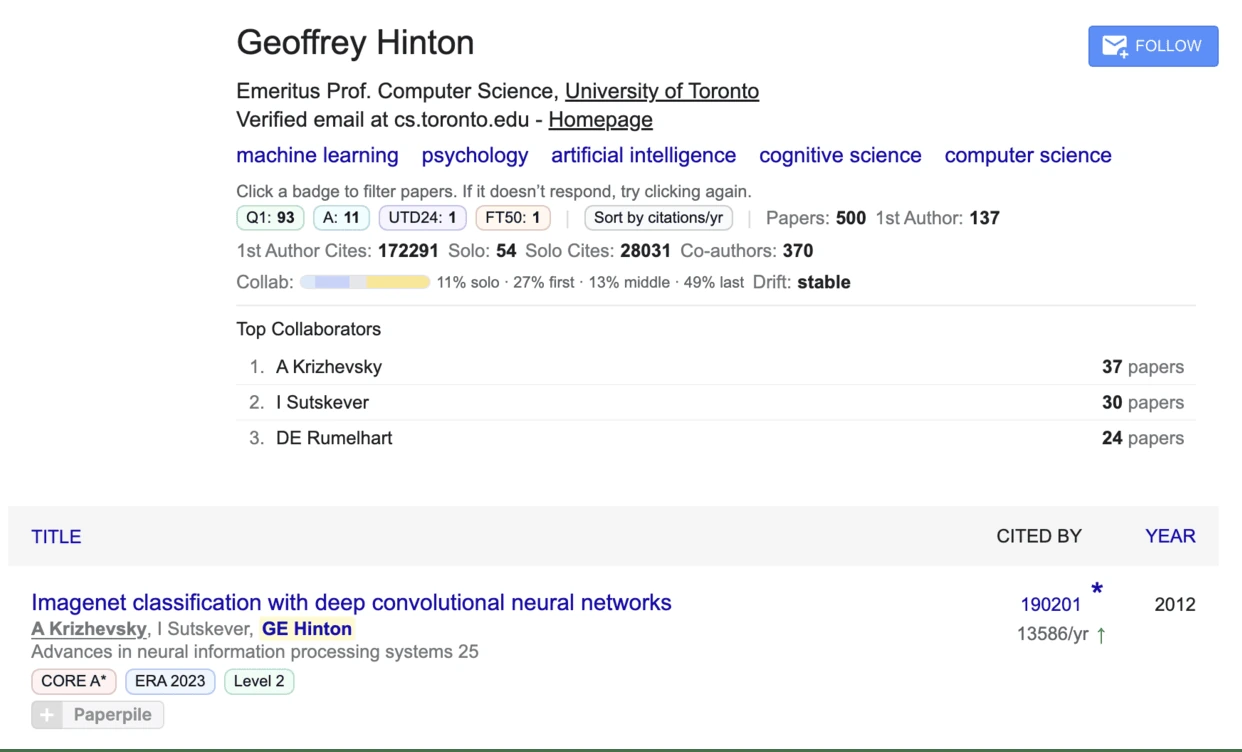
Free · in your browser
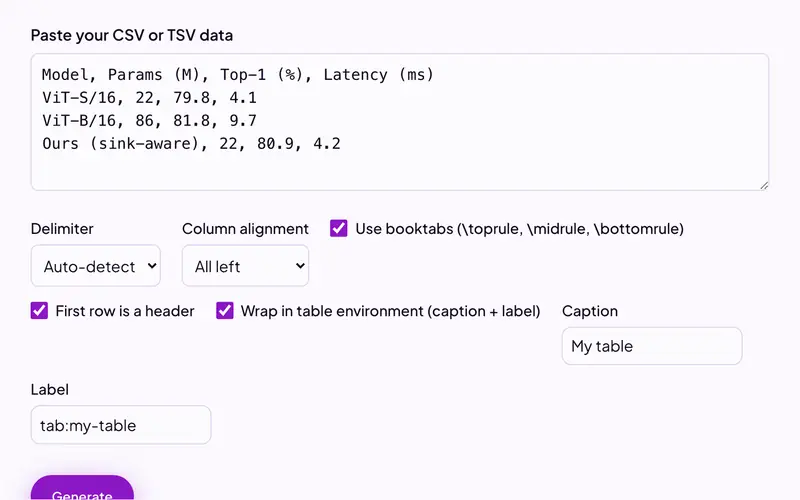
Free tools for academic writing
LaTeX to PDF, BibTeX validation, citation generation, Markdown conversion, and more than twenty others. Everything runs in your browser or an ephemeral container.
Files are processed in memory and never stored. No account, no upload retention.
Guides
Worth reading before you submit
Methodology problems peer reviewers flag
Fifteen problems that draw reviewer comments, from p-hacking to test-train contamination, with the fix for each.
Read the guide → Before you submitGetting feedback on a paper
Colleagues, editing services, AI assistants, preprints and Paper Review, compared honestly.
Read the guide → LaTeX on a MacOverleaf alternatives for Mac
What you gain and give up by writing locally, seven editors compared, and how to move a project.
Read the guide →Questions
Ask the person
who built it.
A question before you buy, a feature your field needs, or something that broke: email me. Every message is read and answered by me, not a support queue.
ben@purplelink.llc