
ModernTex
A native macOS LaTeX editor for researchers. It has multi-file editing, a synchronized PDF preview, and the full academic manuscript workflow in one app.
Refunded if you email within 14 days of purchase. Updates are included forever.
Or get the Mac Suite: ModernTex, Outbound Veil, Legroom, Keyfeel, Tapefolio, Panely, Summonly and Vitae Plus for life, $59.99 once.
“Because you’re an academic you know the game and it shows in your products.” Michael, biologist at Wake Forest University. More from customers
The trial is the full app for seven days, no account, nothing to enter. Buying is $19.99 once, with all updates included, forever (terms). The receipt email includes a permanent license key. After the seven days the app asks for it. Not useful? Email ben@purplelink.llc within 14 days of purchase and it is refunded. Already using the trial? Choose Enter license key in the app, paste the key, and the copy you have unlocks straight away, with no reinstall. Version 1.11.1 · 13 MB disk image · macOS 14 or later · Apple silicon and Intel. Requirements. Also in the Mac Suite with Outbound Veil, Legroom, Keyfeel, Tapefolio, Panely, Summonly and Vitae Plus for life, $59.99 once. First ten minutes: install and first build.
Sixty-five seconds, start to submission
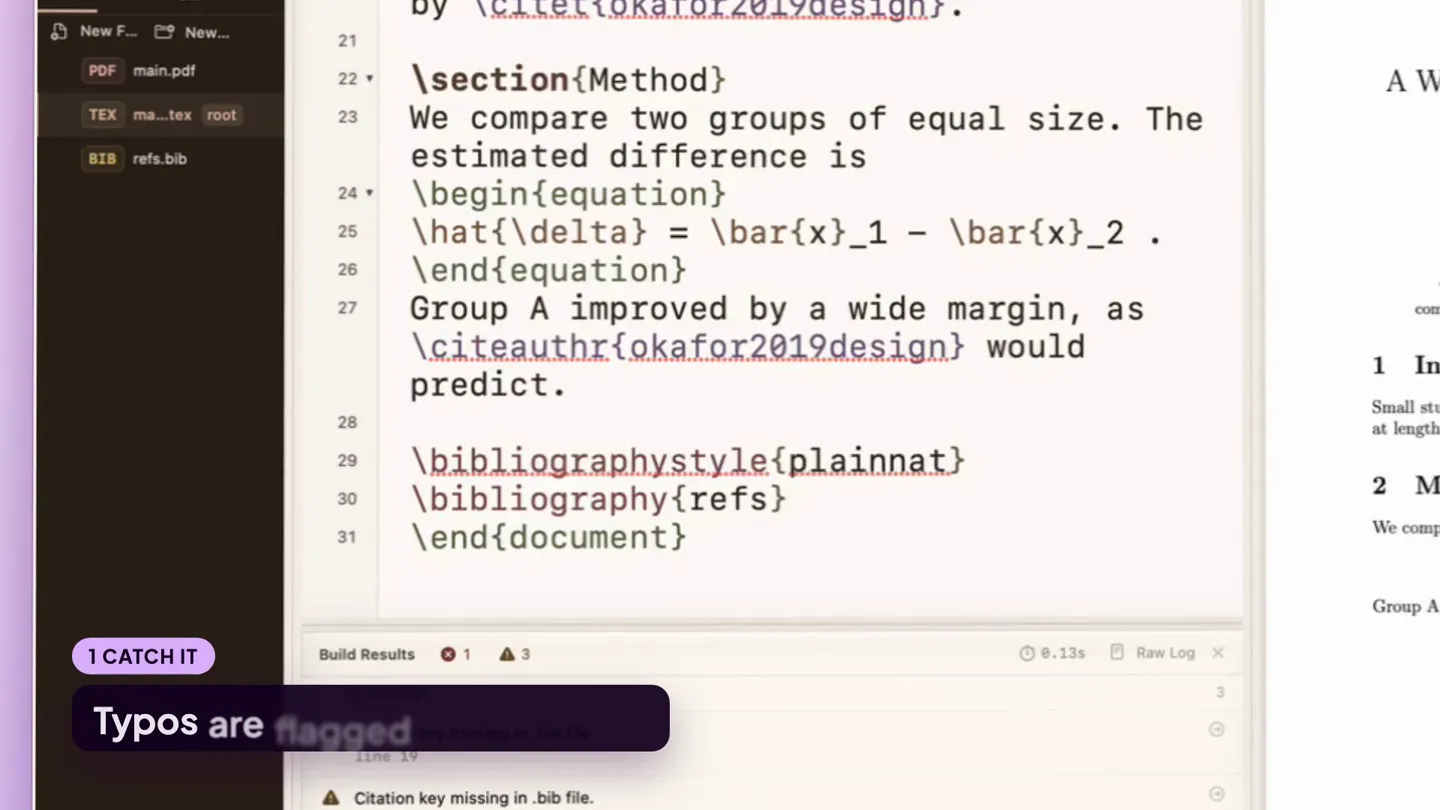
A mistyped command caught as you type, TikZ and tables built visually, a searchable symbol palette, revision snapshots, and the submission checker. Real footage of the app on a sample manuscript.
What customers say
Because you're an academic you know the game and it shows in your products.
ModernTex makes organizing and managing my writing projects easy, from first draft through to final copy.
Amazing, it's fixed now! It's a very nice app!
The overall experience is now just as smooth as my previous setup on Windows.
This is exactly the integration I was hoping for.
.latexmkrc support added in ModernTex 1.10.
Source and PDF, always in sync
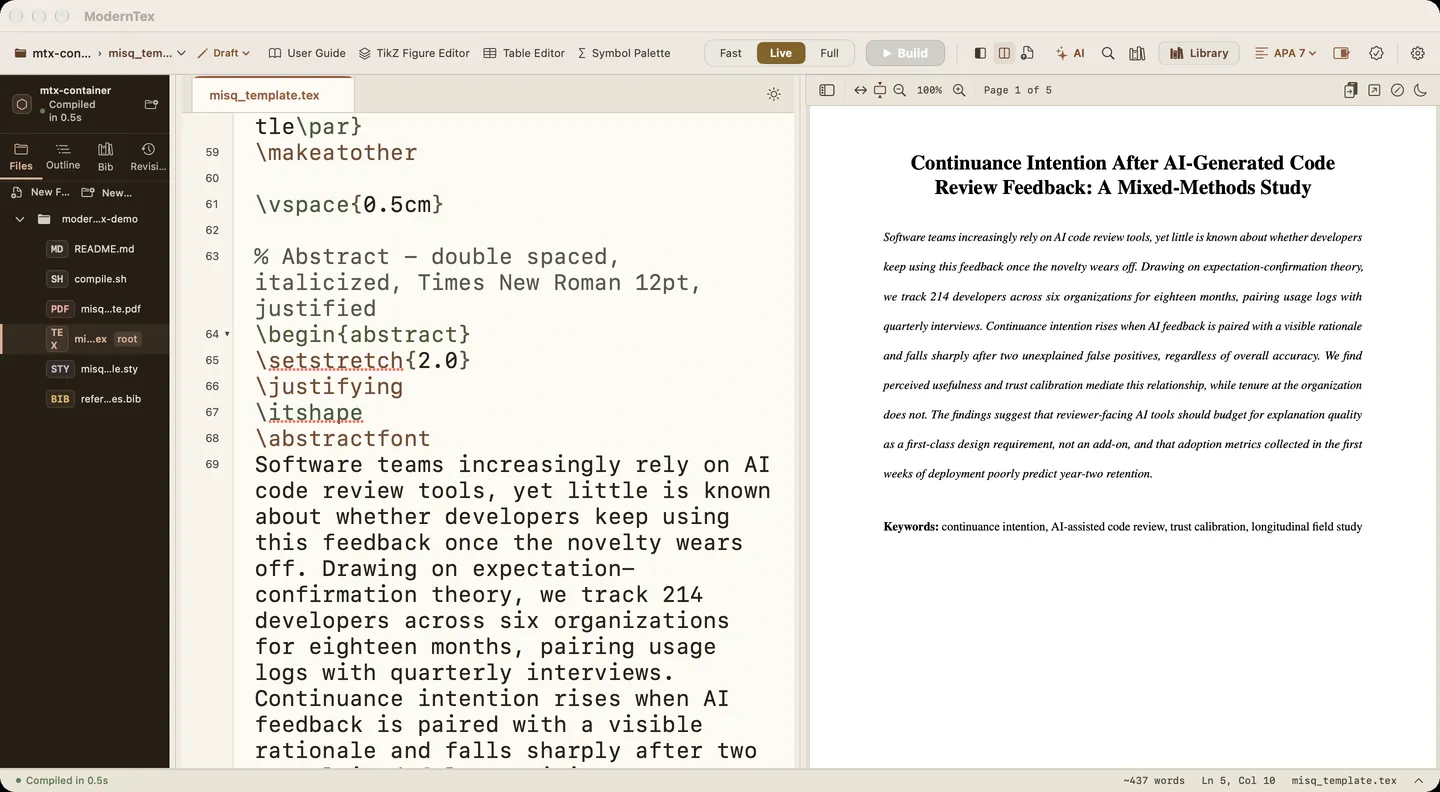
One window holds the project, the source and the PDF it builds. Here is a sample manuscript in it, one part at a time.
-
Open the folder
ModernTex finds the root file and lists the project's chapters, figures and .bib files in the sidebar. Jump between them without losing your place.
-
Write, and it builds
In Live mode the PDF rebuilds as you type. The sample in this window compiled in half a second, on the Mac, with no server involved.
-
Click to jump either way
Click a line in the source to find it in the PDF, or click the PDF to land on the line that made it.
Two things nobody enjoys writing by hand
A TikZ diagram or a results table usually starts as a syntax reference and a blank line. ModernTex builds both visually and drops in the real source underneath. Nothing is hidden, and you could have typed all of it yourself.
TikZ Designer
Drag boxes and arrows into place, pick colors from a swatch, resize by the corner, connect two shapes by dragging between them. Start from a flowchart, pipeline, state machine, or tree preset, or a blank canvas. Reopen an existing diagram from the Figures menu to keep editing it instead of redrawing it.
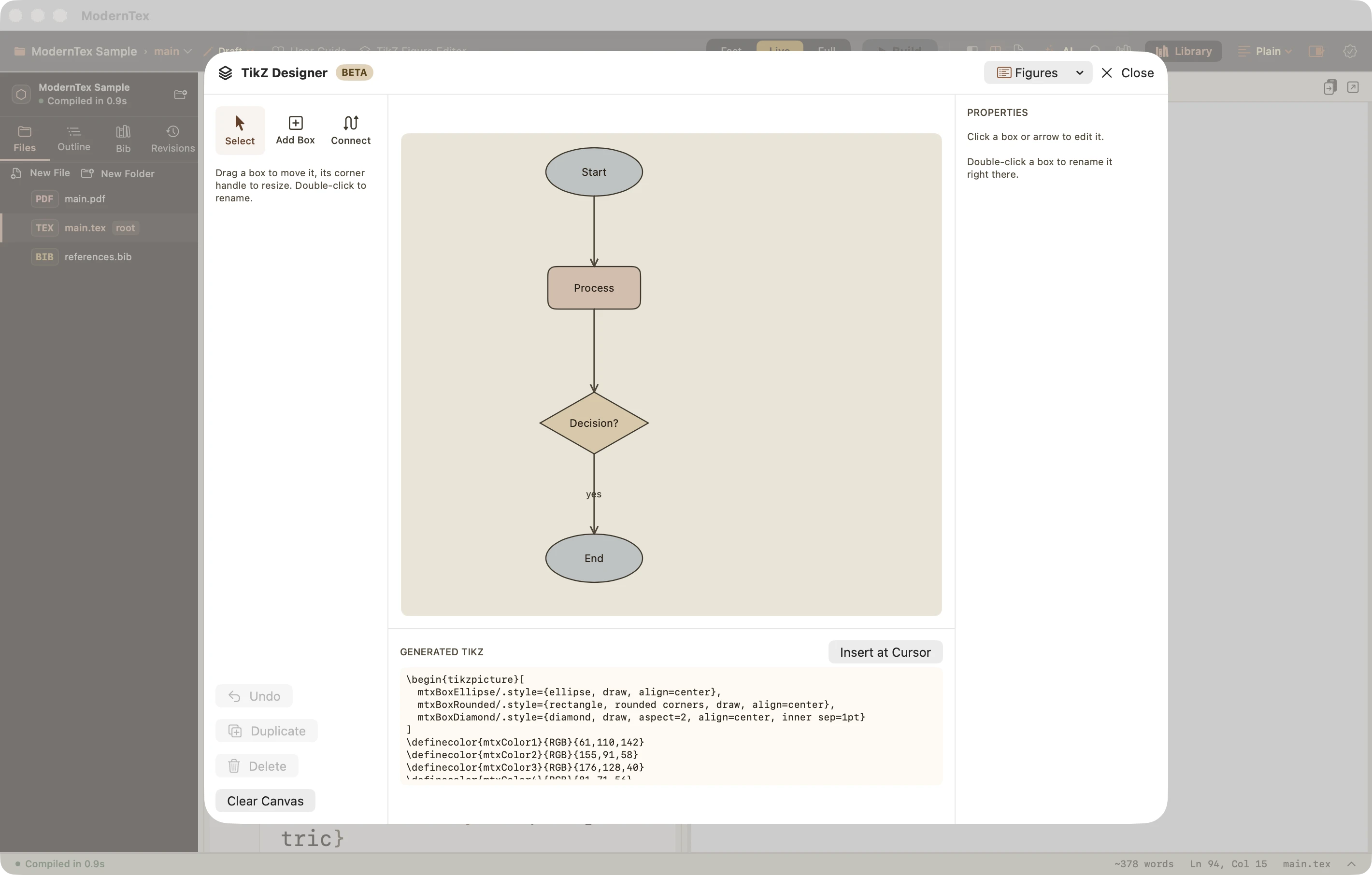
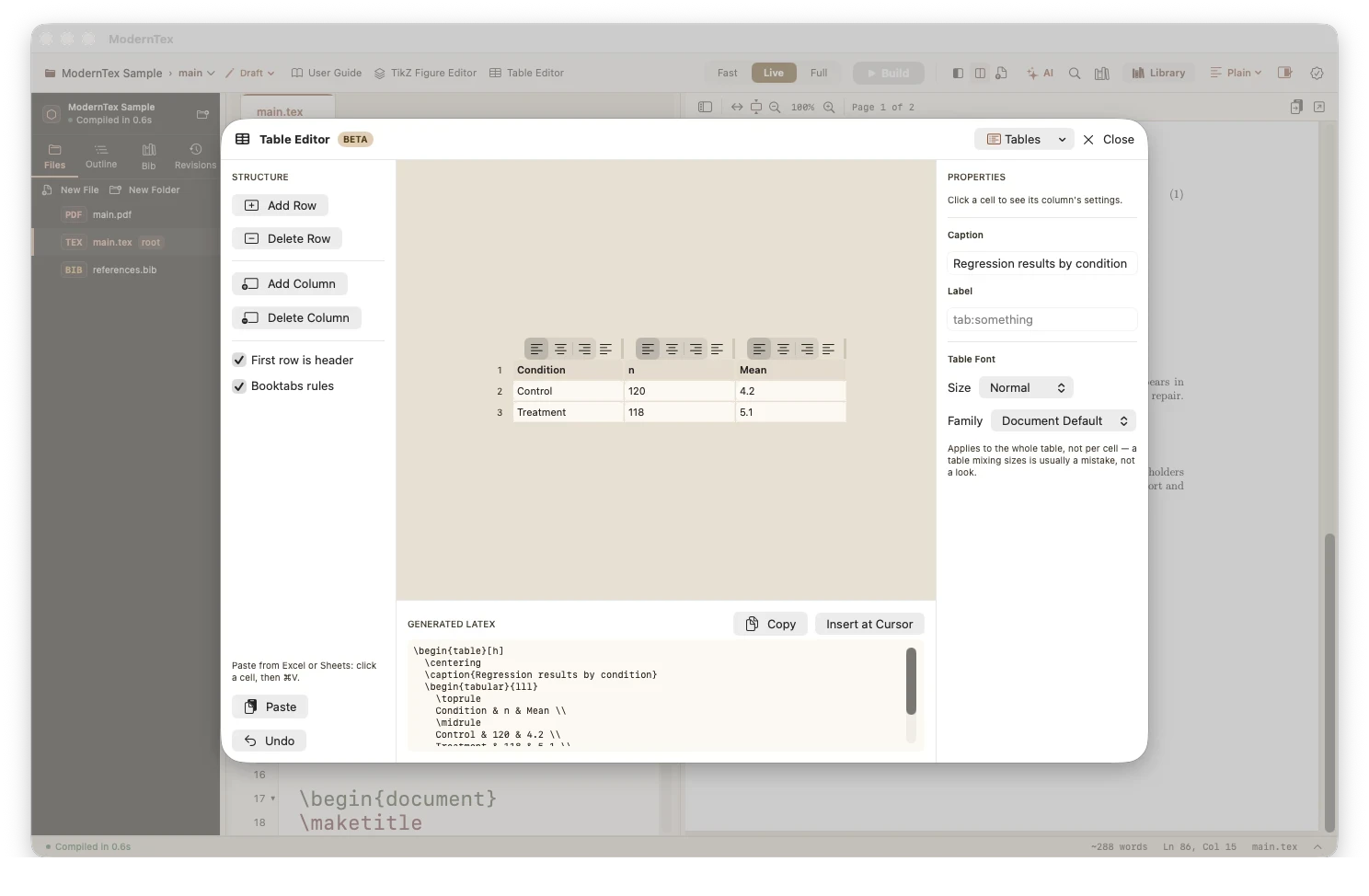
Table Editor
Paste a range straight from Excel or Google Sheets and it lands in the right cells. The table grows if the data is bigger, and the rest stays untouched if it is smaller. Return moves down a row, ⌥Return breaks a line inside a cell, and dragging a column edge resizes it, as in a spreadsheet. Underneath is booktabs-style tabular.
Your manuscript stays a folder of ordinary .tex and .bib files on your Mac. It builds on your Mac, so there is no compile timeout. There is no account to make and no subscription to cancel.
What the manuscript needs
Multi-file manuscript navigation
ModernTex detects the root file and shows a structured sidebar. Jump between chapters, sections, and bibliography files without losing your place.
Three compile modes
Fast, Live, and Full compile modes trade speed for completeness. Live mode keeps the PDF in sync as you type. Full mode does the complete pass before submission.
Synchronized PDF preview
Forward and inverse search: click the source to jump to the PDF, click the PDF to jump to the source. Side by side, always in sync.
Citation management
BibTeX autocomplete that searches your bibliography by author, title, or key, not only the keys you have already cited. Suggestions come from your .bib files as you type a citation.
Submission readiness checks
Automatically check anonymization, page limits, required sections, and submission packaging before you hit send, so formatting problems are caught before a journal returns the paper.
Version snapshots
Take a snapshot at any point, such as before a major revision, after peer review, or before resubmission. Compare any two snapshots in a diff.
Table editor
Paste a range from Excel or Google Sheets straight into the right cells. Resize columns by dragging, set a table-wide font, and generate clean booktabs-style LaTeX underneath.
Native macOS app
Runs on macOS 14 or later, follows your light or dark setting, and uses the standard Mac shortcuts.
From a cryptic error to a fix
LaTeX reports a mistake in its own terms and leaves you to work out what it means. ModernTex translates the error into plain explanations, with a suggested fix.
What LaTeX prints
! Undefined control sequence.
l.42 As shown by \citeauthr
                           {smith2024}, the effect holds.
What ModernTex tells you
LaTeX does not recognize the command \citeauthr on line 42. This is usually a misspelled command, or a package that defines it is not loaded.
Suggested fix
This is an illustrative example, not a capture from the app. The wording varies with the error.
For academic authors
PhD students
You write dissertation chapters and conference papers across multiple files, with deadlines and a committee waiting.
Faculty & researchers
You manage journal submissions, coauthor workflows, several concurrent manuscripts, and each resubmission.
Technical coauthors
You join someone else's LaTeX project, learn its structure, fix compilation issues, and contribute without breaking anything.
Not the right fit if several co-authors need to type in the same document at the same moment (keep Overleaf for that draft), you work on Windows, Linux or an iPad, or you would rather not have a TeX distribution on your Mac. ModernTex was first released in September 2026, so it has less of a track record than TeXShop or Texifier. The comparison of Mac LaTeX editors covers the alternatives.
Coming from another editor
From Overleaf
Bring the project over as a zip, or as a Git clone if your Overleaf plan has Git. It builds on your Mac, so there is no compile timeout. There is no real-time co-editing, so a co-author can stay in Overleaf. How that works, and the comparison.
From TeXShop or TeXstudio
Open the same folder; there is nothing to convert. What changes is plain-language errors, bibliography search by author or title, and submission checks. It is Mac only. The comparison.
From VS Code
VS Code with LaTeX Workshop is free and very configurable. ModernTex is for people who want build, PDF, bibliography and submission checks to work without setting anything up. If you like building your own setup, stay where you are. What I tested.
ModernTex, in facts
| Price | $19.99 once, after a free 7-day trial. All updates included, forever. No subscription. |
|---|---|
| Trial | The complete app for seven days from first launch. No account, nothing to enter. |
| License | A permanent key in the receipt email. There is one download: it runs free for seven days, then asks for the key. Paste it in and the same copy unlocks, updates included. |
| Runs on | macOS 14 Sonoma or later, Apple silicon and Intel. Signed and notarized disk image. |
| TeX distribution | Uses MacTeX or TinyTeX. If neither is installed, ModernTex offers a one-click TinyTeX install. |
| Your files | Ordinary .tex, .bib and figure files in a folder on your disk. No cloud storage and no account. |
| Working with co-authors | No real-time co-editing. Get Changes and Send Changes sync between your Macs or with a co-author. |
| AI features | Optional. Fix with AI proposes a repair for a build error and shows it as a diff before anything changes. It runs on Apple Intelligence on your Mac, or on your own Claude or OpenAI account. Nothing leaves your Mac unless you sign in to Claude or add an OpenAI key, and the app asks for your consent before the first request to either. Purplelink charges nothing for it. |
| Updates | Checks once a day and installs in place, or choose Check for Updates. |
| Current version | 2.0.0, released October 24, 2026. Every update since launch is listed below. |
Thirty-two updates since launch on September 4
- 2.0.0A split editor, multiple cursors, project-wide find, Vim mode and a visual equation editor, plus HTML and EPUB export, knitr and PythonTeX, Zotero, a terminal, remote projects, macros, plugins, custom themes and a German interface (beta).
- 1.11.1After a Get Changes conflict the ...theirs.tex copy holds your co-author's version, ModernTex's own drafts and notes are no longer sent to Overleaf, your git remote or shared ZIPs, and exports run pandoc more safely.
- 1.11.0A custom build command for Full builds: run your own script or tool chain instead of ModernTex's latexmk call, after you approve it once.
- 1.10.2Output from git, latexmk, SyncTeX, pandoc and the TeX setup is no longer cut short when the Mac is busy.
- 1.10.1Template fixes: the engine follows the preamble, a missing .bst names its package, no stale PDF after a failed build, and the outline covers the whole document.
- 1.10.0You can let a project's own latexmkrc run for Full builds after confirming, an extra brace after completing an environment is gone, and the trial's last-day note stays up.
- 1.9.2The trial countdown shows in the window title in focus mode, and the screen after the trial has a way to write to Ben.
- 1.9.1Thesis templates that keep their class in a Styles folder build, and a MacTeX biber that does not start on macOS 27 is replaced by a working one.
- 1.9.0Edit > Convert Accent Commands to Characters, which keeps a Latin-1 file in Latin-1, and double-click in the PDF to jump to the source.
- 1.8.0Chapter-only Live previews, typing that stays fast in long documents, less background work, a light PDF by default, and a 31% smaller download.
- 1.7.6With more than one TeX installation, builds use the one that has latexmk and biber.
- 1.7.5A Full build no longer gets stuck after biber or bibtex fails once; the step runs again and its real error is shown.
- 1.7.4Build Results lists only what is still wrong after a Full build, not warnings an earlier pass already fixed.
- 1.7.3A Full build runs biber with LuaLaTeX and XeLaTeX too, so citations no longer print as bold keys.
- 1.7.2No more stuck Compiling (Live), an error note that names the real error, and "Did you mean graphicx?" for a misspelled package.
- 1.7.1Errors from inside a package now show in Build Results with plain steps, a new SBL reference style, and Stop ends latexmk, the engine and biber together.
- 1.6.3A roomier sidebar: wider by default, no project row at the top, and icon buttons for New File and New Folder.
- 1.6.2The title bar and the toolbar are one row, with the window buttons at the left end of the toolbar.
- 1.6.1A shorter toolbar with Insert and Cite menus. Build errors are marked in the editor with a one-click fix. Build Results stays closed until you open it.
- 1.6.0Changes Since Last Sync: a PDF with your edits marked since you last synced, and what the last Get brought in.
- 1.5.0Builds projects in iCloud Drive and OneDrive. Catches a Figure that points at a table. Shows a checks summary in the status bar. Saves automatic checkpoints.
- 1.4.0One download: free for seven days from first launch, then a license key. Copies you already bought keep working with no key.
- 1.3.6The free trial shows the right price. One dismissible note appears on days 5 and 6 of the trial.
- 1.3.5Light and Dark themes change the whole window. Tooltips are visible. Reading width works in editor-only mode.
- 1.3.4Command-click in the PDF scrolls the editor again. The toolbar fits narrow windows.
- 1.3.3Editor and PDF jumps land in view, a PDF-only layout, a sidebar toggle, plain light and dark editor themes.
- 1.3.2A maintenance release: changes the key that verifies updates. Nothing else is different.
- 1.3.1One Settings window (⌘,) with editor fonts, line spacing, syntax colors and Zen mode.
- 1.3.0Table Editor: paste from a spreadsheet, get booktabs LaTeX.
- 1.2.0TikZ Designer: draw the diagram, get the code.
- 1.1.0Sync with co-authors, compile one chapter, formatting shortcuts.
- 1.0.2A free seven-day trial.
- 1.0.1Clearer bibliography build errors, pointing at the .bib line.
The app installs updates in place. Your work stays in ordinary .tex files, so you can open it in Overleaf or TeXShop whenever you like. Full changelog
Coming from Overleaf? What changes when you write locally, or see how the Mac LaTeX editors compare, including ModernTex against TeXShop and TeXstudio.
Submitting soon? Work through the free submission checklist, or try the free reference and retraction check on your PDF. You can also see a sample Paper Review report ($9, back in minutes).
ModernTex compared with Overleaf
| Topic | ModernTex | Overleaf |
|---|---|---|
| Price | $19.99 once, after a free 7-day trial. No subscription. | Standard plan: $199 per year. A free plan is also offered. |
| Compiling | On your Mac, so there is no server compile timeout. | On Overleaf's servers. The free plan has a compile timeout. |
| Account | None. | Required. |
| Where it runs | Native macOS app. Files are ordinary .tex and .bib files in a folder on your disk. | In the browser. |
| Co-authors | No real-time co-editing. Get Changes and Send Changes sync with a co-author. | Real-time collaboration in the browser. |
| Manuscript tools | Multi-file navigation, synchronized PDF preview, plain-language errors, submission-readiness checks, revision snapshots, BibTeX completion. | See Overleaf's own feature list. |
Prefer Overleaf when several people edit the same draft at the same time, or when you work on Windows, Linux or an iPad. Prefer ModernTex when you write mostly alone on a Mac and want no subscription, no account and no compile limit. Moving over is a zip download or a Git clone (see the FAQ).
ModernTex compared with TeXShop and TeXstudio
TeXShop and TeXstudio are the two free editors most Mac users try first.
| Topic | ModernTex | TeXShop | TeXstudio |
|---|---|---|---|
| Price | $19.99 once, after a free 7-day trial. | Free, under the GPL. | Free and open source, under the GPL v2. |
| Platforms | macOS 14 or later. | Mac only. Version 5.57 needs Mac OS X 10.13 or later. | Windows, Linux, BSD and macOS. |
| Finding your TeX install | Uses MacTeX or TinyTeX. Offers a one-click TinyTeX install if it finds neither. | Looked only at the MacTeX location. With TinyTeX it compiled nothing until the TeX path was set in preferences. | Did not find TinyTeX on that Mac by itself. It worked once the TeX path was set. |
| Signing | Signed and notarized disk image. | Signed and notarized. | The Apple silicon build was unsigned, so macOS blocked it until approved. |
Price, license and platform: texstudio.org and the TeXShop page, checked on October 13, 2026. Setup and signing: the tests in our LaTeX editors guide, run October 11, 2026 on TeXShop 5.57 and TeXstudio 4.9.8 with TinyTeX installed.
Prefer TeXShop or TeXstudio when free matters most, or, for TeXstudio, when you also work on Windows or Linux. In the same test TeXstudio ran BibTeX by itself, and TeXShop needed BibTeX run as a separate step. Prefer ModernTex when you want submission-readiness checks and an anonymized export for blind review in a Mac app. More detail: ModernTex against TeXShop and TeXstudio and the LaTeX editors for Mac compared.
What ModernTex needs
A Mac running macOS 14 or later and a TeX distribution. MacTeX or TinyTeX both work, and you do not have to set either up first: if ModernTex cannot find one when you compile, it offers a one-click TinyTeX install in the editor. After checkout you get a signed disk image. Open it and drag ModernTex to Applications. Bookmark the download page, which always gives you the newest version.
First ten minutes: install and first build
Want one email when a notable version ships? Leave your address. No newsletters, no follow-ups.
Your email is used for release notes and nothing else. Privacy Policy · Why ModernTex →
Buying for more than one person?
Buy seats here with a card. Each seat is one license key. The more seats, the lower the price per seat, and every seat in an order is charged the price of its tier. From 25 seats it is $9.99 each, about half the single-copy price.
Need an invoice or a purchase order instead? Ask for a quote. You get an invoice, and a W-9 on request, so a lab or a department can pay with a purchase order or a P-card. Write to ben@purplelink.llc with the number of seats and who the invoice should name.
| Where documents go | Nowhere. Manuscripts are edited and compiled on the Mac. There is no cloud sync and no data collection. |
|---|---|
| Licensing | One key per person, verified inside the app with no server involved. There is no activation count and no license server to reach. |
| Updates | The app checks once a day and installs in place. Updates are included in the purchase. |
| Installing | One signed, notarized disk image for macOS 14 or later, Apple silicon or Intel. Each person needs a TeX distribution (MacTeX or TinyTeX), and ModernTex can install TinyTeX itself. |
| Trying it first | The same download runs the complete app free for seven days, with no account. |
Frequently asked questions
How do I get updates?
What macOS version is required?
I lost my license key. How do I get it back?
Is there a free trial?
What does it cost?
How is ModernTex different from TeXShop or Overleaf?
Can I move a project from Overleaf?
Why not just use a free editor like TeXstudio?
Does ModernTex support multi-file projects?
Does it work for a dissertation?
Will I have to pay again for a new version?
Does ModernTex work offline?
What if I stop using ModernTex?
What if ModernTex stops being updated?
What does Fix with AI send?
Does it work with my journal's or university's class file?
Write to Ben
A question about ModernTex that this page does not answer? Write to Ben here.
Prefer your own mail app? Write to ben@purplelink.llc. The form delivers your message by email through Resend and does not store it on this site. Privacy.
Try it on your own manuscript
Seven days of the full app, no account. If it earns a place in your workflow, it's $19.99 once.
macOS 14 or later · Apple silicon and Intel · Signed and notarized