
Free web tool
Photo to Logo
Turn a cutout photo of an animal or object into a logo mark made only of straight lines and circle arcs, the way a designer builds one with a ruler and compass. It runs in your browser. The photo is never uploaded.
This tool needs a browser from 2023 or later: Chrome or Edge 69, Firefox 105, or Safari 16.4.
Bytes of your photo sent anywhere: 0
- iPhone and iPad: in Photos, touch and hold the subject, then choose Copy.
- Mac: in Photos, right-click and choose Copy Subject; or in Preview choose Tools, Remove Background.
- Windows 11: in Photos choose Edit, Background, Remove, then save.
- Android: in Samsung Gallery or Google Photos on a Pixel, touch and hold the subject.
The download has a transparent background. For a favicon, open the PNG in PNG to ICO.
Your photo is read and traced in this tab, in a background worker. The only requests the page makes are for its own scripts and, if you ask for it, the sample. Your photo is never sent anywhere.
How it works
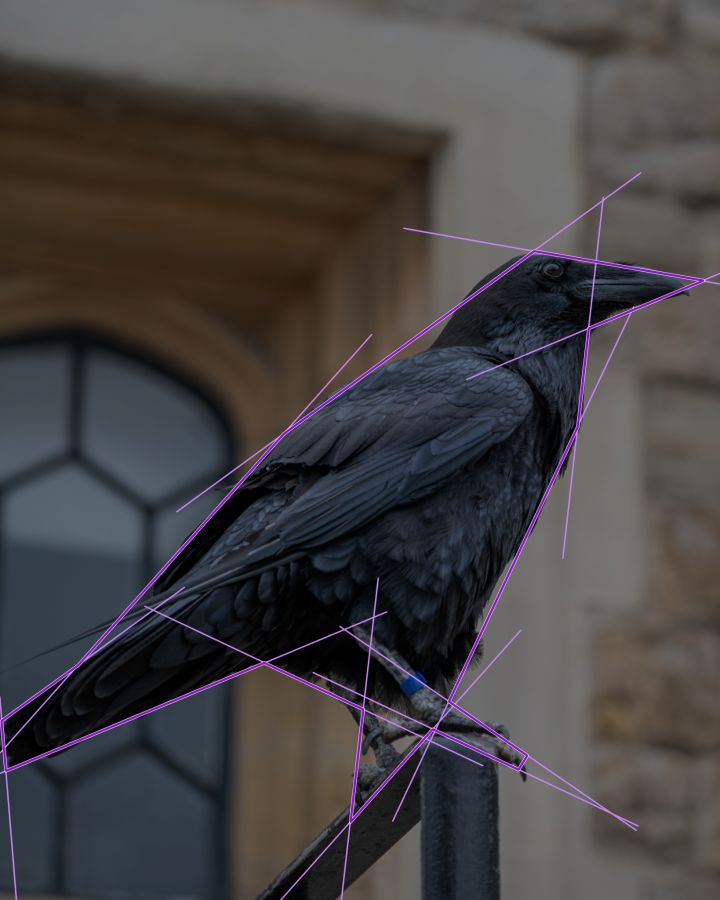
A designer can build a logo from a photo with a ruler and compass: draw a circle for every curve, a few guide lines at repeated angles, then trace the outline only along those lines and circles and fill it flat. This page does the same steps with geometry instead of a pen.
It takes the outline of your cutout, splits it where the direction changes, and fits each run with a straight line or an arc of a circle. Lines are turned to the nearest of a few angles and made parallel to each other, arcs that nearly share a centre are made concentric, and neighbouring pieces are joined where they cross or touch.
It builds twenty versions with different detail and angle settings, scores each one on how closely it matches your subject at full size and at 16 and 32 pixels, and shows the three best. The result is a starting draft: a designer would usually adjust a line or two.
How to turn a photo into a logo
- Cut out the subject. On an iPhone, iPad or Mac, touch and hold or right-click the subject in Photos and choose Copy Subject. On Windows 11 use Photos, Edit, Background, Remove.
- Add it. Paste the cutout on this page, or drop the saved PNG on the box. A photo on a plain white or one-colour background also works.
- Pick a mark. Look at the three marks and the construction drawn over your photo, and choose the one that reads best.
- Download. Choose a colour and download the mark as SVG for print and editing, or as PNG.
Limits
- The mark is the outer silhouette only. Eyes, stripes and other inside detail are not traced.
- One subject per image. A cutout with two animals, or a body and tail cut apart, is refused.
- A photo with a busy background is not traced. Make a cutout first, or use a photo on a plain background.
- Files up to 50 MB. The photo is worked on at 1024 pixels on its long side.
- Needs Chrome or Edge 69, Firefox 105 or Safari 16.4, or later.
Questions
Is my photo uploaded?
Which photos work best?
How do I make a cutout?
Why does it need a cutout?
How is the mark made?
Can I use the logo for my business?
How is this different from an AI logo generator?
Is it free?
If this saves you time, you can leave a tip. It helps keep these tools free and online.